
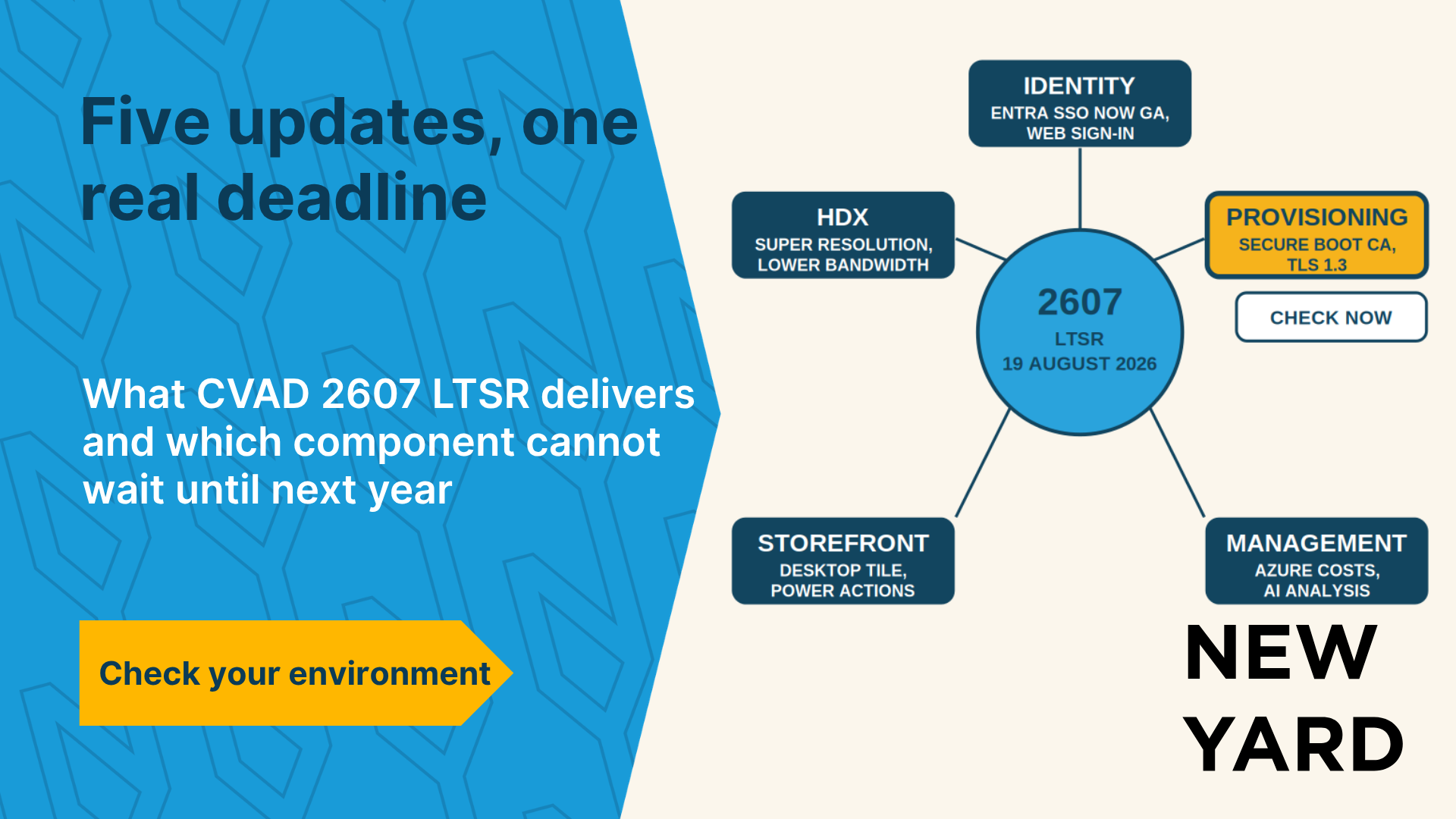
Your Citrix environment is up and running. Users are working. And then a new Long-Term Service Release (LTSR) is released. The question that follows is always the same: what’s included, and do I need to do anything about it? With an LTSR, that question carries more weight than with a Current Release. After all, you’re choosing stability, not the latest features. CVAD 2607 LTSR was released on August 19, 2026, and affects virtually every part of the platform: from VDA and HDX to Provisioning, StoreFront, and Workspace Environment Management. Here’s what you need to know.
What is CVAD 2607 LTSR, and who is it intended for?
A Long-Term Service Release is the stable version of Citrix Virtual Apps and Desktops. You get a longer support cycle, fewer changes, and cumulative updates instead of new features every few months. On the other hand, you won’t receive new functionality until a new LTSR is released. That’s the case now. The previous LTSR was 2507, released in August 2025.
An LTSR is intended for organizations that prioritize predictability over speed. Think of industries such as healthcare, manufacturing, logistics, and financial services, where a workspace that simply works is more important than one that offers the latest features. Those who actively keep up with new features are better off on the Current Release channel.
- Long-Term Service Release: stable foundation, long support cycle, fewer changes
- Current Release: latest features, shorter lifespan, more frequent updates
What are the key HDX and VDA improvements in 2607?
Less bandwidth per session
Citrix has addressed protocol efficiency. According to its own internal tests, a virtual session consumes approximately 14 percent less bandwidth than in the previous LTSR. Source: Citrix Blogs, August 19, 2026.
Important to know: This figure comes from the supplier’s own test environment, not from independent research. The impact in your environment depends on your workload, your protocol settings, and your network. It will be most noticeable on connections that are already strained, such as home offices, overseas branches, and locations using mobile internet.
HDX Super Resolution without an additional GPU
HDX Super Resolution improves image quality by using the endpoint’s GPU instead of a dedicated GPU in the server. This is beneficial for organizations that want sharper images without investing in graphics cards in the data center. This way, the computing power available in your users’ laptops is still utilized.
Printing and Peripherals
The PDF Universal Print Driver now features its own settings screen within the session, allowing users to customize their print preferences. Additionally, the driver no longer leaves documents on the endpoint after printing, which prevents a small but real data leak on shared devices. In addition, support for peripherals used in business-critical workflows has been improved, which is particularly relevant for scanners, handheld terminals, and medical equipment.
Diagnostics for FIDO2 and Network Issues
A new FIDO2 diagnostic tool is included with the VDA. Users who work with security keys or Windows Hello for Business and encounter redirection issues no longer have to guess where the problem lies. In addition, there is a machine policy for EDT MTU rediscovery, which allows the session to better adapt to changing network conditions.
What’s changing in the login and user experience?
The biggest change is in identity. Microsoft Entra single sign-on for Entra hybrid joined session hosts is now generally available and is no longer in preview. For the many SMB environments that use hybrid joined sessions, this means that the workaround involving FAS or manual workarounds is no longer the only option.
In addition, there is a web sign-in feature to unlock an Entra hybrid-joined desktop, although that feature is still in preview. There is also a policy that causes closing a published application to disconnect the session rather than log the user out. That may sound like a minor detail, but it saves users who accidentally close a window from having to go through the entire login process again.
The Citrix Virtual Desktop Assistant has been enhanced with an overview of the session’s graphics settings and proactive notifications—for example, when resource usage is rising or profile storage is nearly full. This allows users to identify issues on their own sooner, rather than having the service desk reconstruct them after the fact.
What’s new in terms of management and costs?
Cost management is moving to the forefront of the process. When provisioning machines in Microsoft Azure, you now see a cost estimate before the resources are deployed. This makes the discussion about cloud costs more concrete, because it takes place at the time of the decision rather than only when the invoice arrives.
Autoscale also offers a vacation scheduling feature that automatically reduces capacity during periods when you know in advance that there will be little work. Examples include construction industry holidays, public holidays, and company-wide closures.
In Web Studio, you can now search for a domain and add domains to an exclusion list. This is useful in environments with multiple trusts, where a domain that is no longer accessible can slow down or cause the console to freeze.
What does 2607 mean for security and compliance?
Two features stand out. Session Recording now includes AI-powered analysis, which automatically reviews recordings and flags security and compliance findings. Organizations often record thousands of sessions per day, but in practice, manual review rarely occurs. Administrators can also securely export recordings for audits and legal proceedings.
In addition, App Protection now provides reporting on policy activations and security events in near real time. This makes it easier to demonstrate that measures are not only in place but are actually working. For organizations working on NIS2 or an ISO certification process, this is the difference between a policy on paper and evidence during an audit.
What’s new in Citrix Provisioning 2607?
Support for the new Secure Boot CA certificates
This is the part that deserves the most attention. Microsoft’s Secure Boot CA certificates have expired and have been replaced by new certificates. Citrix Provisioning 2607 supports these new certificates. If you’re running a version that doesn’t, you risk encountering boot errors on machines with Secure Boot enabled.
This warning was also included in previous releases and does not represent a new insight. However, it is the only point in this release that does not concern convenience or efficiency, but rather continuity. Furthermore, it affects not only Provisioning itself: your hypervisor and your existing VMs must also adapt.
Secure console connections and more stable reconfiguration
The console now uses TLS 1.3 to connect to the Provisioning server. Additionally, existing service principal names are no longer unnecessarily removed during reconfiguration, which eliminates a known source of authentication issues following changes.
What’s new in StoreFront 2607?
StoreFront 2607 was released one day before CVAD, on August 18, 2026. The most significant addition is an expanded desktop tile. Users can now see a preview, the operating system, the power status, and the time of their last connection for each desktop, as well as the duration of an active session.
- A preview of the desktop instead of a generic icon
- Operating system and power status, including statuses such as maintenance and unavailable
- Time of last connection, which alerts users to unusual usage
- More targeted power actions for administrators via PowerShell
That last point about the final connection is particularly noteworthy. It’s not a security feature in the traditional sense, but it does make users the first to notice anything out of the ordinary.
What are the risks of staying where you are?
Staying on an older LTSR is a defensible choice. That’s exactly what the model is intended for. But there are limits to how long you can keep doing that:
- Risk of failure on Secure Boot machines if your provisioning version does not support the new certificates
- No supported path for Entra SSO in hybrid-joined environments, forcing you to continue relying on workarounds
- Higher bandwidth consumption on connections that are already strained
- No visibility into cloud costs prior to rolling out Azure machines
- Manually reviewing session recordings remains the only option for compliance issues
- The end-of-support date for your current LTSR is approaching, and upgrading two versions at once is always more challenging than upgrading just one
Practical Checklist for CVAD 2607 LTSR
- Check which LTSR or Current Release you are currently running and when support for it expires
- Verify whether Citrix Provisioning is in use and whether Secure Boot is enabled on the machines
- Check which certificates your hypervisor and existing images are using
- Determine whether your environment is Entra hybrid-joined and which SSO route you are currently using
- Measure your current bandwidth usage per session so that you’ll know whether there’s a noticeable difference after the upgrade
- Check whether Session Recording is active and what happens to the recordings
- Verify that the new StoreFront tile aligns with your current user instructions
- First test the upgrade in a non-production environment with a representative user group
- Plan the upgrade of the VDA, Delivery Controller, StoreFront, and Provisioning in a coordinated manner, not separately
How does New Yard view this release?
At New Yard, whenever a new Citrix release comes out, we don’t focus on the list of features, but rather on what a release means for the people who work with it every day. Selling an LTSR as something you have to install right away would be nonsense. The model exists precisely so you don’t have to upgrade every three months.
At the same time, there is definitely a reason to take a close look at your environment now with the release of 2607, and it’s not about the bandwidth gains. It’s about the certificates and the fact that your current version has an expiration date. We’ll help you assess what this release means for your specific environment, whether you’re working on-premises, in the cloud, or in a hybrid setup. We don’t perform the upgrade ourselves; instead, we make sure you ask the right questions of the party that does.
Want to know if 2607 has any implications for your environment?
An upgrade doesn’t have to be a major project. But proper preparation makes the difference between a smooth transition and a series of unexpected problems, such as machines that no longer boot up because a certificate is no longer valid.
Schedule a no-obligation introductory meeting with New Yard. Together, we’ll review your current situation and give you honest advice on the next step—even if that step is to do nothing for now.