

6 minutes
Something you used to have to pay for to take advantage of and make your life easier in terms of Windows Updates is now completely free starting in May. Microsoft has made Hotpatching for Windows Server 2025 available at no additional cost, via Azure Arc for anyone running on-premises or hybrid.
No separate billing lines. No cost per core. Those who were already using Hotpatching through Azure Arc saw billing automatically stop as of mid-May 2026.
What does this mean specifically? And what do you need to take advantage of it?
What is Hotpatching and what are the benefits?
Hotpatching is a technique in which security updates are applied to a running server without the need for a reboot. The patch is loaded directly into the active memory of the operating system. The server remains fully available to users and applications while the update takes place.
Until recently, this kind of technology was known only from the Linux world. With Windows Server 2025, Microsoft is bringing it to the familiar Windows environment, and is now making it available for free through Azure Arc.
The benefits are immediate:
- No more scheduled reboots for monthly security updates
- Servers remain available to users and applications during patching
- Less coordination with the business on maintenance timing
- Faster compliance with patch obligations, without waiting for an appropriate reboot moment
- Reduced risk of problems after restart on critical production servers
Source: Microsoft Tech Community, May 2026 – Simplified access to Hotpatching enabled by Azure Arc for Windows Server 2025
What will change in practice for your patch cycle?
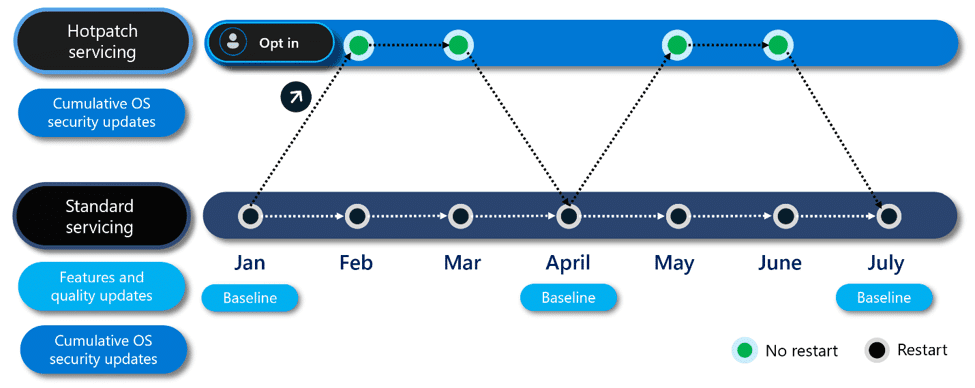
The update cycle operates on a quarterly basis. Every three months, Windows Server 2025 installs a cumulative baseline update, which does require a restart. So that’s four reboots per year instead of 12.
In the remaining months, hot patches are rolled out: up to eight per year, without a reboot. This gives you a predictable rhythm:
- January, April, July, October: baseline update with restart
- Other months: hot patch without restart
For IT teams, this means establishing four maintenance moments per year instead of 12. You can schedule those moments at quiet times, in consultation with the business. The other months are free of scheduled downtime due to patching.
What do you need to activate Hotpatching?
You don’t need a new license or separate product. What is required is:
- Windows Server 2025, build 26100.1742 or higher
- Virtualization-Based Security (VBS) enabled on the server
- The Azure Connected Machine Agent installed on the server (see: Microsoft Learn for full prerequisites)
- Onboarding via Azure Arc
- Activation of the Hotpatch feature via the Azure Portal or Azure Update Manager
The Azure Connected Machine Agent is free. All you need is an Azure tenant, which most organizations already have. You don’t have to move any workloads to Azure. The servers can continue to run on-premises.
Note: VBS is a requirement because Hotpatching modifies code directly in server memory. Microsoft uses VBS to protect the kernel from exploits during this process. Verify that VBS is active via msinfo32.exe. If it is not yet, a one-time reboot is required after enabling it. See also: Microsoft Learn – Enable Hotpatch for Azure Arc-enabled servers
Frequently asked questions about free Hotpatching via Azure Arc
Is Hotpatching only available for new servers?
No. Any server running Windows Server 2025 (build 26100.1742 or higher) is eligible. You do not need to purchase any new hardware.
Should I move my workloads to Azure?
No. Azure Arc enables a management connection from your on-premises environment to the Azure portal. Your servers just stay where they are.
What does Azure Arc itself cost?
The Azure Connected Machine Agent is free of charge. Separate fees apply for additional functionality within Azure Arc, such as Defender for Servers or Extended Security Updates. For Hotpatching itself, you pay nothing.
Does this also work for Citrix or Parallels environments?
In environments such as Citrix Virtual Apps and Desktops or Parallels, a Golden Image is typically used. In this, a base image is updated and then deployed to all session servers. In that case, Hotpatching is less relevant because the update process is set up differently. In contrast, for traditional Windows Servers outside the Golden Image model, Hotpatching is well suited.
I’m still on Windows Server 2019 or 2022. What should I do?
Hotpatching is currently only available for Windows Server 2025. An upgrade to 2025 is necessary to take advantage of this feature. That’s a good time to evaluate your server infrastructure anyway.
Practical checklist: ready for free Hotpatching?
- Check which servers are already running Windows Server 2025
- Verify that the build version is 26100.1742 or higher
- Verify that VBS (Virtualization-Based Security) is enabled via msinfo32.exe
- Make sure you have an Azure tenant, or create one
- Install the Azure Connected Machine Agent on the target servers
- Onboard the servers via Azure Arc
- Activate Hotpatch via the Azure Portal or Azure Update Manager
- Schedule the four baseline reboots and communicate them internally
- Remove monthly reboot times for these servers from your maintenance calendar
How New Yard helps with smarter patch management
At New Yard, we regularly see organizations where systems are weeks or even months behind on updates. Not because it is intentionally delayed, but because monthly reboots are practically difficult to schedule. There’s always a reason to push it another week.
That’s exactly where Hotpatching makes a difference. The barrier to staying current becomes a lot lower when you no longer need a reboot for most security updates.
We help organizations move to Windows Server 2025, set up Azure Arc correctly and integrate Hotpatching into a broader patching strategy. Without unnecessary complexity, suited to your environment.
Ready to put monthly reboots behind you?
Hotpatching is now free. The barrier has been removed. All that remains is the move to Windows Server 2025 and proper Azure Arc setup.
Want to know if your environment is Hotpatching ready, or want to spar about a smart update strategy for Windows Server 2025? Schedule a no-obligation introductory meeting via newyard.co.uk.